Swimmetry
- 2.3
- Rating
- 10.00K
- Installs
- Free
- Price
 Analysis by App-foxy
Swimmetry is a focused sports app for swimmers who want a clearer way to follow progress, set goals, compare performances, and keep an eye on swimming news. After spending time with it, my main impression is that it works best as a personal reference point between practices rather than as a complete replacement for a coach, a training log, or a live timing system. Its idea is useful: bring several parts of a swimmer’s routine into one place. The execution feels more uneven, but swimmers who enjoy tracking improvement may still find a practical role for it.
The app comes from 10KLakes, LLC and is free to install, with optional purchases ranging from $1.99 to $12.99 per item. It is listed for Everyone, so it can suit younger swimmers as well as adults, although a parent or coach may still want to be involved when younger athletes use rankings or comparisons. The current release is version 1.2.79, and it runs on Android 7.0 or later.
What Swimmetry is really useful for
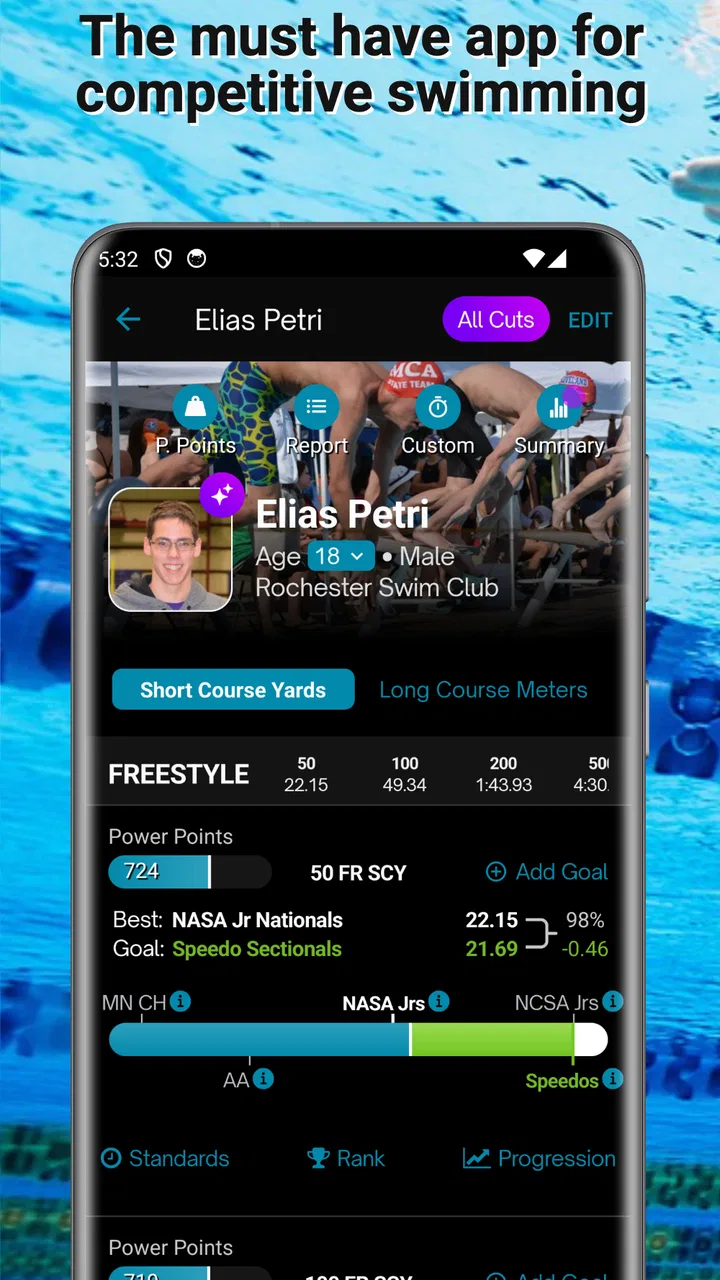
The strongest part of Swimmetry is the way it encourages swimmers to look at progress as an ongoing process instead of judging one practice in isolation. A single race or workout can feel disappointing, especially when fatigue, nerves, or a difficult training set affects the result. A progression view gives that result more context. I found the concept most helpful when I treated the app as a place to notice direction: am I moving toward a goal, staying level, or losing consistency?
You May Also Like

 AccuWeather: Weather Radar
AccuWeather Review: A Quick, Clear Forecast for Everyday Decisions
For everyday plans, the best forecast is the one you can understand quickly. AccuWeather makes rain timing, radar, and local conditions easy to act on, with a few trade-offs.

 Hill Climb Racing
Why Hill Climb Racing Still Turns Crashes Into One More Run
A tiny car, a bumpy hill and one more upgrade: Hill Climb Racing keeps resurfacing because its simple chaos makes every near-miss feel personal.

 AliExpress - Shopping App
AliExpress Makes Global Shopping Feel Personal, but Shoppers Bear the Risk
AliExpress turns a global marketplace into a pocket-sized discovery engine. Its reach is useful, its shopping loop compelling, and its trade-offs easy to miss.

 Lords Mobile: Kingdom Wars
Lords Mobile Is a Kingdom-Building Routine, Not a Quick Match
A case-by-case verdict on the building, battles, device demands, and social commitments that make Lords Mobile rewarding for some players and exhausting for others.

 PDF Scanner app - TapScanner
TapScanner Makes Paperwork Easier to Capture, Check, and Share
TapScanner makes scanning with a phone feel less like a rescue operation and more like a dependable step in getting work done. Its capture tools are useful, though not flawless.

 Block Blast!
 Shows How Much a Puzzle Game Can Leave Out
A quiet grid game shows why puzzle players increasingly value instant clarity, repeatable skill and low-pressure play—and where the genre still needs to catch up.
More From Our News Desk
View All News


That approach matters because swimming improvement is rarely a straight line. A swimmer may improve in one event while struggling in another, or make technical progress that does not immediately appear in a race result. The app’s combination of progressions and goal tracking makes it easier to think in terms of several targets rather than one all-important number. That is a better mindset for long seasons and regular training.
The comparison tools are also potentially valuable, but they need to be used carefully. Comparing your own performances over time is generally more constructive than comparing yourself with every other swimmer available. I would begin by choosing a small set of meaningful events and recording them consistently. Once that personal baseline is established, rankings and broader comparisons become more informative instead of simply becoming a source of pressure.
My practical advice is to use the app first as a reflection tool, then as a competition tool. Start with personal goals, check whether your results are moving in the desired direction, and only afterward look at rankings. That order makes the information more useful for training decisions and less likely to turn every swim into a judgment about ability.
Progress tracking that supports better conversations
One overlooked benefit of a progress record is that it can improve conversations with a coach. Rather than saying, “I feel slower lately,” a swimmer can point to the events or goals that feel off and discuss possible reasons. The app cannot explain whether the cause is technique, pacing, recovery, or an unusually demanding training block, but it can help identify where a conversation should begin.
I can imagine using it after a weekend meet: review the swims, note which goals were reached, and mark the events that deserve attention before the next practice. That is more useful than checking a result once and forgetting it. It also gives a swimmer a simple routine for turning competition results into questions.
For parents, the app may offer a less intrusive way to follow development. Instead of asking after every practice whether a child improved, a parent can look at agreed goals and discuss progress at a calmer time. That only works if the swimmer remains comfortable with the process. Tracking should support motivation, not make the athlete feel watched constantly.
Why the news and rankings matter differently
The news element gives Swimmetry a broader sports identity. It can make the app feel more connected to swimming beyond an individual training log. For a committed swimmer, that context may help maintain interest during periods when personal progress is slow. It is a small but sensible complement to the tracking tools.
Rankings serve a different purpose. They are most useful when a swimmer already understands the limits of comparison. Different pools, meets, age groups, competition levels, and stages of a season can affect how meaningful a position feels. A ranking can provide motivation, but it should not be mistaken for a complete evaluation of a swimmer’s potential.
I would especially caution younger athletes about checking rankings too often. The app’s Everyone rating makes it accessible to a broad audience, but accessibility does not remove the emotional effect of competitive numbers. A healthy routine might involve reviewing rankings at a planned interval and focusing daily attention on controllable goals such as consistency, pacing, or preparation.
A realistic everyday workflow
Consider a high-school swimmer preparing for a meet. Before practice, the swimmer checks the goals that matter for the current period rather than trying to remember every previous result. After the session or meet, the swimmer reviews the relevant progression and notes whether the performance moved closer to the target. Later in the week, the swimmer can use the comparison view to understand whether the result was typical or unusual.
The important detail is keeping the workflow narrow. I would not try to track every possible event, every practice feeling, and every ranking at once. That creates noise. A better method is to choose a few priority events, revisit them regularly, and use the news section separately when looking for swimming-related interest. Swimmetry becomes more useful when it is part of a repeatable habit rather than an app opened only after a disappointing race.
This is also where the app differs from ordinary alternatives. A notebook can be more flexible and more personal, while a spreadsheet can offer deeper customization. A coach’s records may provide better technical context. General fitness apps may handle exercise volume more broadly. Swimmetry’s appeal is its swimming-specific focus and its mix of goals, comparisons, rankings, and news. The trade-off is that a focused app may not give the same freedom as a system you build yourself.
Where the experience falls short
The clearest warning sign is the public reception: Swimmetry has an average rating of 2.3 from around 91 ratings, with about 70 written reviews, and more than 10K installs. Those figures do not erase the usefulness of the concept, but they do suggest that the experience has not worked smoothly for everyone. I would approach it with realistic expectations rather than assuming that a polished, universally dependable training platform is waiting inside.
A low average rating is particularly important for an app built around records and comparisons. If entering information feels awkward, if progress is difficult to interpret, or if the app does not fit a swimmer’s existing routine, users may stop maintaining it. Tracking tools only become valuable when the habit survives beyond the first few sessions.
There is also a built-in limitation to what this kind of app can tell you. Progress numbers can show that something changed, but they cannot replace technical observation. A swimmer may post a slower time while improving a turn, or record a faster swim while reinforcing a flaw that will matter later. Without video, coaching feedback, or detailed workout context, the app should not be treated as the final authority on performance.
The comparison features can create friction for a different reason. They may encourage a swimmer to focus on other people’s results when the more useful question is whether personal execution improved. This is not a flaw unique to Swimmetry, but it matters here because comparisons are part of the app’s central appeal. Users who are motivated by competition may enjoy that feature; users who become discouraged by rankings may be better served by a simpler private log.
The optional purchases are another point to consider. The app is free to install, but some items cost between $1.99 and $12.99. I would spend time with the free experience before paying for anything, especially given the mixed overall rating. The right test is not whether an extra item sounds appealing, but whether it removes a real obstacle in your routine or adds information you will actually use.
How to avoid turning tracking into extra work
My biggest workflow recommendation is to decide in advance what information deserves attention. If you open Swimmetry without a purpose, rankings and news can distract from the progress you originally wanted to monitor. A short review after a meet is more sustainable than repeatedly checking every available view.
I would also keep goals specific enough to guide action. “Get better” is too broad to help. A swimmer can instead choose an event, a period for review, and a result or progression to watch. The app can organize that intention, but the swimmer still has to define what success means. This is one reason the app works better alongside coaching than alone.
Another useful habit is to separate result review from emotional reaction. Immediately after a race, disappointment or excitement can distort judgment. Looking at the progression later may reveal that a supposedly poor swim was still part of a longer improvement pattern. Conversely, a personal best may deserve a closer look if it came with pacing or technique problems. Swimmetry can support that pause, provided the user does not treat its numbers as a verdict.
Who should use it and who should skip it
I think Swimmetry is best suited to swimmers who already care about measurable development and want a swimming-specific place to organize goals. It may be a good fit for competitive youth swimmers, club athletes, parents supporting a swimmer’s season, and adults returning to structured swimming who want more direction than a general fitness tracker provides.
It is also worth considering for someone who enjoys comparing personal results across a season. The app’s value grows when the user returns consistently and makes comparisons meaningful. A swimmer who likes reviewing patterns, setting targets, and discussing results with a coach is more likely to benefit than someone who only wants a quick workout timer.
I would skip it if you want a highly detailed training diary, advanced workout programming, or a complete replacement for coaching. A notebook may be better for free-form notes. A spreadsheet may be better for custom formulas and long-term analysis. A coach’s platform may be better when technique, attendance, workload, and individualized instruction all need to be connected.
I would also be cautious if rankings tend to affect your motivation negatively. In that case, use only the goal and progression elements if they meet your needs, or choose a private tracking method that keeps attention on your own development. An app should make training clearer, not make every swim feel like a public exam.
What the rating and platform details mean for a download decision
Swimmetry is a free sports app with an Everyone content rating, so the basic barrier to trying it is low. Its release history reaches back to June 26, 2017, and the current version is 1.2.79. The age and operating-system requirements make it accessible to many Android users, but the mixed rating means I would treat installation as an experiment rather than a commitment.
Before relying on it for an entire season, I would test a complete small cycle: choose a few goals, record relevant performances, review the progression, and see whether the comparisons genuinely help. If that process feels natural, the app may earn a place in your routine. If it feels like duplicate work or produces more anxiety than insight, there is little reason to force it simply because it is swimming-specific.
The developer, 10KLakes, LLC, has positioned the app around a useful combination of swimmer-focused tools. The concept is more distinctive than a generic step counter or broad workout app, but the low average rating tells me that the idea alone is not enough. Reliability, clarity, and ease of regular use matter just as much as the feature list for a tracking product.
My final recommendation
My verdict is cautiously positive for the right swimmer. Swimmetry has a clear purpose, and its blend of progressions, goals, comparisons, rankings, and news can give a season more structure. I especially like the possibility of using it to turn scattered meet results into a conversation about direction and priorities. That is a meaningful role for an app, even when it does not provide the technical depth of a coach or a custom training system.
At the same time, I would not recommend it blindly. The average rating of 2.3 and the modest install base indicate a product that deserves testing before trust. Keep the free experience focused, avoid paying until you know which additions you need, and judge it by whether it helps you maintain a useful swimming habit.
Swimmetry is worth trying when you want swimming-specific progress tracking, but it is not the right choice if you need a complete coaching or training-management platform. For a goal-oriented swimmer who enjoys reviewing performance, it may become a helpful companion. For everyone else, a simpler log or a more comprehensive coaching tool may be the better fit.
FAQs for Swimmetry
01What is Swimmetry, and who is it designed for?
Swimmetry is a swimming-focused app designed to help users monitor, understand, and improve their training. It can be useful for recreational swimmers, structured-training athletes, and people who want a clearer view of their swimming progress. Before downloading, check whether its tracking features match your preferred swimming style, workout routine, and compatible device setup.
02What features does Swimmetry offer for tracking swimming workouts?
Swimmetry is intended to provide useful information about swimming sessions, such as workout duration, distance, pace, intervals, and other performance-related statistics, depending on the device and data available. The exact metrics may vary by platform and connected hardware, so users should review compatibility details before relying on the app for advanced training analysis.
03Does Swimmetry work without a smartwatch or additional swimming hardware?
Some Swimmetry functions may be available directly through a phone, but detailed swimming tracking generally depends on compatible wearable equipment or sensors. Phones are not always convenient or reliable in the pool, particularly for lap counting and stroke recognition. Before installing, verify which devices are supported and whether the features you want require a smartwatch, sensor, or subscription.
04Is Swimmetry suitable for beginners as well as experienced swimmers?
Swimmetry can be helpful for beginners who want to build consistency and understand basic workout results, while more experienced swimmers may appreciate detailed statistics and progress tracking. However, the amount of information can feel overwhelming at first. New users should begin with simple goals and confirm that the app explains its metrics clearly enough for their current swimming experience.
05Is Swimmetry free to download, and are there in-app purchases?
The availability of free and premium features may depend on the platform, region, and current version of Swimmetry. Some functions can be offered at no cost while advanced analytics, training tools, cloud features, or expanded history may require a subscription or one-time purchase. Check the official store listing carefully for pricing, trial conditions, and renewal information before downloading.
Pros
- Clear swim tracking helps monitor pace
- distance
- and workout progress.
- Useful training data can support more structured pool sessions.
- Clean interface makes key swimming metrics easy to review.
- Suitable for swimmers who want consistent performance records.
- Progress history can help identify improvements over time.
Cons
- Some features may require a compatible smartwatch or sensor.
- Battery use can increase during GPS or continuous workout tracking.
- Advanced analytics may feel excessive for casual swimmers.
- Accuracy can vary depending on device placement and pool settings.
- The app may offer limited value for users who rarely swim.

Swimmetry
Gallery